Ebike Speedometer Wrong After a Conversion? Wheel Size, Magnet and Display Settings
A converted ebike shows the wrong speed when the display's wheel circumference, pulse or magnet count, or units don't match the bike. Here is how to measure rolling circumference with a roll-out and why a wrong setting also skews Limit Mode and range figures.
AK
Andy Kirby
Reviewed by the KirbEbike conversion-support team
Share
On this page
MOTORS & CONTROLLERSCIRCUMFERENCE, NOT INCHESUK + US
The UKC1++ colour display. The speed in the middle is only as good as the wheel figure behind it.
The Short Answer
If your speed or distance is wrong after a conversion, the system almost always has the wrong idea of how far the wheel travels in one turn. The same figure drives the trip, the odometer and any speed cap, so they are all off by the same amount.
Check, in order: the wheel-size or circumference setting against your actual tyre, the pulse or magnet count for your speed sensor (motor Hall sensors or a spoke magnet), and the km/h or mph setting. Then roll the wheel out and set the real figure. A 26 x 4.0 fat tyre on a display set for a 26 x 2.1 tyre can under-read by roughly 10 to 14%.
How a Converted Ebike Works Out Your Speed
No ebike display measures speed directly. It counts pulses, converts them to wheel revolutions, and multiplies by the distance one revolution covers. So only three settings can make it wrong: the circumference, the pulse count per revolution, and the units. Grin Technologies put it plainly: wheel size and poles settings must be correct for an accurate speed display (Grin).
Wrong Wheel Size: Nominal Size vs Rolling Circumference
Wheel “size” is a family name, not a measurement. 26, 27.5 and 29 inch describe rims with bead seat diameters of 559, 584 and 622 mm (the second number in the ETRTO code on your sidewall). The display needs the rolling circumference: how far the bike moves when the tyre turns once. A wider tyre is also taller, so the same rim can need very different settings. 700C and 29 inch share the 622 mm rim; tyre width is the difference, as our 700C guide explains.
Nominal Circumferences for Common Conversion Wheel Sizes
Tyre size
ETRTO
Circumference (mm)
Source
26 x 1.95
50-559
2,050
CatEye chart
26 x 2.10
54-559
2,068
CatEye; Garmin
26 x 2.35
58-559
2,083
CatEye; Garmin
26 x 3.00
75-559
2,170
CatEye; Garmin
26 x 4.0 fat
about 100-559
about 2,300 to 2,400
Estimate, see note
20 x 4.0 fat
about 100-406
about 1,820 to 1,910
Estimate, see note
27.5 x 2.1
54-584
2,148
CatEye chart
27.5 x 2.25
57-584
2,182
CatEye chart
700 x 25C
25-622
2,105
CatEye; Garmin; Sheldon Brown
700 x 28C
28-622
2,136
CatEye; Garmin; Sheldon Brown
700 x 35C
35-622
2,168
CatEye; Garmin; Sheldon Brown
700 x 45C
45-622
2,242
CatEye; Garmin
29 x 2.1
54-622
2,288
CatEye; Garmin
29 x 2.3
60-622
2,326
CatEye; Garmin
From the CatEye tyre circumference chart, Garmin’s wheel size table and Sheldon Brown’s calibration page, November 2026. None of these charts lists 4-inch fat tyres. The fat rows are our rough calculation: π × (rim bead seat + 2 × tyre height), taking tyre height as 85 to 100% of a 101.6 mm (4.0 in) width. Measure a fat tyre; don’t trust the estimate.
Sheldon Brown notes that chart figures are generally accurate to within one or two per cent, because tread, pressure and rider weight change the real figure. A chart gets you close. A roll-out gets you right.
How Big Is the Error? Some Worked Examples
The error is the ratio of the two circumferences. Set too small, the display reads low; set too big, it reads high.
Display set for
Tyre actually fitted
Display reads
Real speed when screen shows 25 km/h
26 x 2.10 (2,068 mm)
26 x 4.0 fat (about 2,300 to 2,394 mm)
10 to 14% low
27.8 to 28.9 km/h (17.3 to 18.0 mph)
700 x 28C (2,136 mm)
29 x 2.3 (2,326 mm)
8% low
27.2 km/h (16.9 mph)
26 x 2.10 (2,068 mm)
27.5 x 2.1 (2,148 mm)
4% low
26.0 km/h (16.1 mph)
29 x 2.1 (2,288 mm)
700 x 25C (2,105 mm)
9% high
23.0 km/h (14.3 mph)
26 x 2.10 (2,068 mm)
26 x 1.95 (2,050 mm)
Under 1% high
24.8 km/h (15.4 mph)
Illustrative calculation, not a KirbEbike test. Real speed = displayed speed × (actual circumference ÷ set circumference), using the chart values above.
A small width change on the same rim barely matters. A different rim family, or a fat tyre, matters a lot, and that is exactly what happens when a kit wheel ends up on a different bike.
Where the Speed Signal Comes From: Motor Hall Sensors vs a Spoke Magnet
Speed source
Typical on
What the system has to know
Common failure
Motor Hall sensors
Direct-drive hub motors
How many Hall pulses equal one wheel revolution, set from the motor’s magnet count (and gear ratio, for a geared motor)
Wrong magnet or pole setting after a motor or controller swap: speed off by a large, fixed factor
Motor Hall sensors on a clutched geared hub
Geared hub motors
Same, plus the gear reduction
The motor stops while the wheel freewheels, so the speed reads wrong when coasting
External spoke-magnet sensor
Mid-drives; some hub kits
Number of magnets on the wheel (usually 1)
Magnet too far from the sensor, or set for the wrong number of magnets
From Grin’s Cycle Analyst 3.1 settings summary and the Kunteng KT-LCD3 user manual, used here as a widely documented example of a generic display.
Hub Motors: Speed From the Hall Signals
A direct-drive hub turns once per wheel turn, and its Hall sensors switch as the rotor magnets pass. The controller counts those pulses, so no extra sensor is needed, but the system must know how many pulses make one revolution. The KT-LCD3 manual calls this P1: gear reduction ratio × number of rotor magnet pieces. Grin’s Cycle Analyst calls it “#Poles”, the pulses that count as one wheel revolution, found by turning the wheel slowly once and counting.
Get it wrong and the error is a factor, not a few per cent. Set double the true count and the display shows half your real speed.
Geared Hubs and the Freewheel Problem
A geared hub’s clutch lets the wheel overrun the motor, so the motor slows or stops while you coast. The KT-LCD3 manual warns that reading speed from a clutched motor is inaccurate whenever the rotor turns slower than the wheel. An external wheel sensor avoids this.
Mid-Drives: Speed From a Spoke Magnet
A mid-drive turns the cranks, not the wheel, so Grin notes it needs an external speed sensor. KirbEbike’s mid-drive kit page lists one in the box. With one spoke magnet the pulse setting (P2 on the KT-LCD3) is 1; with two, it is 2. Keep the magnet close to the sensor, or missed pulses make the speed drop out.
km/h or mph: The Unit Setting
25 mph is 40.2 km/h; 25 km/h is 15.5 mph. If your speed looks about 1.6 times off, check units first. The trap is limits: Grin’s manual says changing units does not rescale stored values such as the odometer and speed limits, so a limit of 25 set in km/h can become 25 mph. Recheck every speed value after switching.
What a Wrong Setting Does to the Speed Cap, Limit Mode and Range
Every Speed Cap Uses the Same Reading
A speed cap can only act on the speed the system calculates, so it is wrong by the same percentage. The KT-LCD3 manual, for example, stops the motor when speed exceeds the maximum riding speed setting.
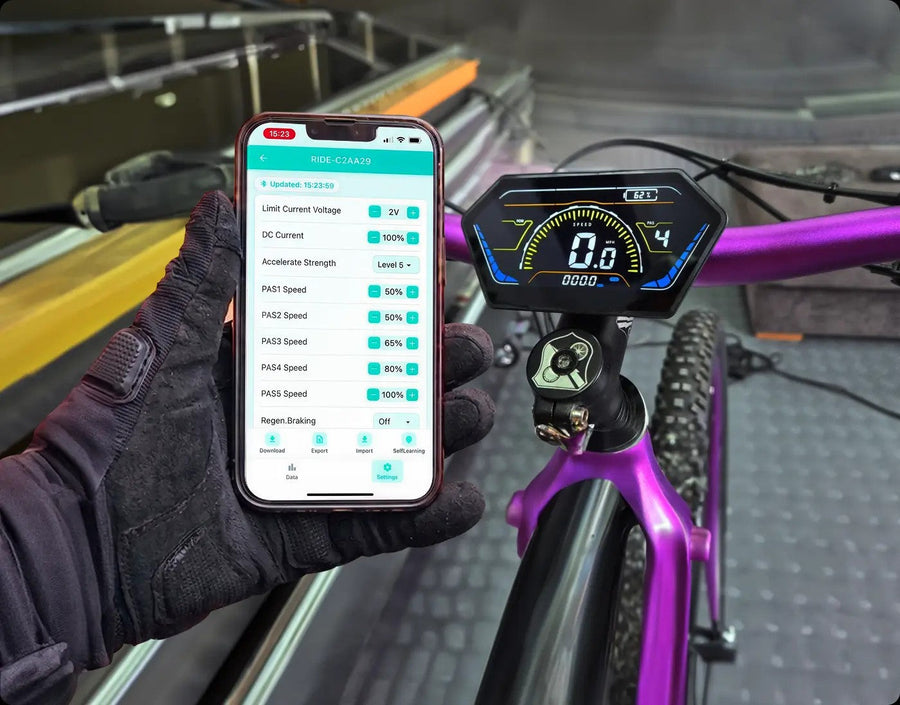
On KirbEbike’s smart controller, holding the display’s UP button caps output at 250W / 25 km/h in Limit Mode; the Ride Power app manual lists three limited modes, each with pedal assist capped at 25 km/h, plus unlimited. The PAS1 to PAS5 speed settings depend on the same reading. In the fat-tyre example, a screen showing 25 km/h could mean 28 to 29 km/h on the road.
Limit Mode is a riding cap, not a legal setting; the controller page itself says a software limit does not change the motor’s rated power. Kits above 250W stay private-land or off-road kits at every setting.
Range and Consumption Figures
Trip and odometer use the same circumference. Suppose you use 600 Wh and the display says 40 km: 15 Wh/km. If the tyre is really 11% bigger than the setting, you rode about 44.5 km at about 13.5 Wh/km. Fix the wheel setting before blaming the battery, then compare with the range calculator and our range loss guide.
The LCD81F colour display: speed, trip, odometer and average all use one wheel figure.
How to Measure Rolling Circumference: the Roll-Out Method
CatEye, Sheldon Brown and Grin all describe this method.
Set the tyre to your normal riding pressure.
Use the wheel your speed signal comes from. For a hub motor that is the motor wheel. For a spoke sensor, the wheel with the magnet.
Turn the wheel until the valve is at the bottom and mark the floor directly below it.
Sit on the bike with the bars straight while a helper pushes it. Your weight flattens the tyre.
Roll forward until the valve is at the bottom again and mark the floor. For better accuracy, roll three or four turns and divide.
Measure between the marks with a metal tape in millimetres. If your tape is in inches, multiply by 25.4.
Setting It on Your Display
If the display accepts a circumference in millimetres, enter your roll-out figure. Many only offer a list: the KT-LCD3 gives 13 sizes from 6 to 28 inches, including 26 and 700C, and doesn’t say what circumference sits behind each. Pick your nominal size, check against a known distance or phone GPS on a steady run, and if it is still clearly off (likely on a fat tyre), try the neighbouring size and keep the smaller error.
Where These Settings Live on a KirbEbike System
KirbEbike’s display page lists three displays: the LCD81F Color Display, the NC-S6 4.5" Display and the UKC1++ Display. Each kit page names the display it ships with.
The Ride Power app’s published settings are Limit Current Voltage, DC Current, Accelerate Strength, PAS1 to PAS5 Speed, Regen.Braking, Limit Mode and Selflearning, and its real-time data includes speed and Hall state. No KirbEbike page lists a wheel-size or unit option in the app, so look in the display menu, and ask support for your display’s manual before changing parameters you don’t recognise. If you swapped the display, read Are Ebike Displays Interchangeable? first.
Quick Diagnosis: Match the Symptom to the Setting
Symptom
Most likely cause
Check first
Speed a few per cent high or low
Wheel size or circumference doesn’t match the tyre
Roll-out figure vs setting
Speed about 10 to 15% low on a fat bike
Display set for a standard-width tyre
Roll-out; fat tyres are missing from most charts
Speed off by about 1.6 times
km/h vs mph
Unit setting, then every stored limit
Speed off by double, half or another large factor
Wrong pole, magnet or pulse count
Pulse setting against the motor or number of spoke magnets
Speed drops to zero when coasting
Clutched geared hub read through its Hall sensors
Use an external wheel sensor if your system supports one
Speed flickers or cuts out at random
Spoke magnet missing the sensor, or a loose connector
Magnet gap and alignment, sensor plug
A starting point drawn from how the settings work, not a substitute for your display’s manual.
Product touchpoint
Displays and the smart controller
The ebike display comes as the LCD81F Color Display, NC-S6 4.5" Display or UKC1++ Display. The smart controller pairs with the Ride Power app for current, PAS speeds, regen and Limit Mode, with live speed and Hall state readouts. The mid-drive kit includes its own speed sensor.
Conclusion: Measure the Wheel, Then Trust the Number
Wrong speed after a conversion comes from the circumference, the pulse count or the units. Tyre errors are a few per cent, up to about 14% on fat tyres; pulse errors are big fixed factors; unit errors are 1.6 times. Roll the wheel out, set the real figure and check it against a known distance. Speed, odometer, range and every speed cap then work from the right number.
Get the wheel right, then plan the ride
Roll-out → circumference → pulse count → units → check.
Why is my ebike speedometer wrong after a conversion?
Usually the wheel size or circumference doesn’t match the tyre fitted. Less often the pulse or magnet count is wrong, or the units are mph instead of km/h.
Does tyre width really change the speed reading?
Yes. On the CatEye chart a 26 x 2.10 is 2,068 mm round and a 26 x 3.00 is 2,170 mm, about 5% more. Measure a 4-inch fat tyre.
Are 700C and 29 inch the same wheel size setting?
They share the 622 mm rim, but tyre width changes the circumference. A 700 x 25C is 2,105 mm and a 29 x 2.3 is 2,326 mm on the CatEye chart, about 10% apart.
Will a wrong wheel setting change my Limit Mode speed?
Yes. If the display under-reads by 10%, the cap acts about 10% higher. Limit Mode is a riding cap, not a legal setting.
Can I set wheel size in the Ride Power app?
KirbEbike’s published list of app settings doesn’t include wheel size or units. Check your display’s menu and ask support for the manual for your display model.
A note on safety and the rules. Do test runs away from traffic. In Great Britain a converted bike counts as an EAPC only with a motor of no more than 250W continuous rated power that stops assisting at 15.5 mph (GOV.UK). Speed caps and Limit Mode do not change a motor’s rating, so kits above 250W are for private land or off-road use with the landowner’s permission.
About this guide
Author: Andy Kirby. Last reviewed: November 2026. KirbEbike has not run its own speedometer accuracy test. Tyre circumferences come from the CatEye, Garmin and Sheldon Brown charts; fat-tyre figures and error percentages are illustrative calculations shown in the text. Display behaviour comes from Grin’s Cycle Analyst documentation and the KT-LCD3 manual as generic examples. KirbEbike details come from the live display, smart controller and mid-drive kit pages and the Ride Power app manual, November 2026.
Stay in the know
Conversion guides, fitting advice and the deals worth knowing about. No spam.