Are Ebike Displays Interchangeable? Voltage, Protocol, Connector and Controller Matching
Mostly not. A display has to match the controller on five separate counts, and the plug fitting is only the first of them — which is why so many replacement displays power up and then refuse to run the bike.
AK
Andy Kirby
Reviewed by the KirbEbike conversion-support team
Delen
Unlock £10 off today
Op deze pagina
MATCH THE SYSTEM, NOT THE PLUGPOWERS ON ≠ COMPATIBLEUK + US
A display is the last link in the chain. The plug is only the first of five checks.
The Quick Answer
No, ebike displays are not generally interchangeable. A replacement must match your system voltage, communication protocol, connector family, pinout and controller family or firmware generation — all five. A matching plug satisfies exactly one of them.
Start from the controller rather than the screen. The controller decides what a display has to speak, how it is powered and which pin does what; the display is the part that has to comply. And treat a display that lights up as a partial result only — the real test is whether controls, assist levels, speed reading and error reporting all work. Our display and controller range lists what we supply.
Direct Answer: Five Checks, Not One
All five have to pass. Most failed replacements pass the first and fail one of the others.
Check
What it establishes
If it fails
Connector family and keying
Whether the parts physically mate
Will not connect, or mates wrongly
System voltage
Whether the display suits your pack
Damage or no operation
Communication protocol
Whether they can talk at all
Display lights up, bike does nothing
Pinout and pin order
Which contact carries which function
Wrong signal on the wrong pin
Firmware and controller family
Whether features and generation align
Partial function or error codes
The plug is the only one you can check by looking, which is why it is the one people rely on.
A connector that mates proves the shells were made to the same shape. It says nothing about voltage, protocol, pin function or firmware.
Start With the Controller, Not the Display
The controller sets the requirements. It determines the communication protocol, the supply arrangement and the pin functions, and the display has to match all of them. So the first job is identifying what you already have: the controller model and, importantly, its generation, since manufacturers revise protocols and pin arrangements between production runs while the outward appearance stays the same. Then establish the protocol it uses and the voltage the display port provides. Our installation mistakes guide covers safe working around a powered system while you do this.
If you cannot find the controller model, look for a label on the unit itself, the documentation supplied with the kit, or the original listing. Photograph anything you find before disturbing it. If none of that yields a model and generation, ask the supplier rather than proceeding — buying a display against an unidentified controller is guessing with money.
What Each Check Actually Tells You
Display and app together. Some systems let an app take over settings; check what yours supports.
Voltage. A display draws power from the controller, and its input requirement has to fall inside what the controller supplies. Systems differ, and a display built for one arrangement may be damaged by another or simply refuse to start. Check the stated requirement rather than assuming, and remember that a pack's nominal label is not its fully charged voltage.
Communication protocol. This is the one that catches most people. Displays and controllers exchange data over a serial protocol — commonly a UART-style connection or a CAN bus arrangement, and sometimes something proprietary to one manufacturer. Two units that both use "UART" may still be incompatible, because the protocol name describes the transport and not the message format. A display can power up over a shared supply pin and still be unable to hold a conversation with the controller.
Connector families. Higo and Julet-style waterproof connectors, and the various JST-style plugs, are families of shells rather than wiring standards. The same shell appears across products from different manufacturers with different internal arrangements. Not all 5-pin Higo or Julet displays are interchangeable, and treating them as though they are is the single most common cause of a wasted purchase.
Pinout. Two identical shells can carry different functions on the same physical contacts, so a pinout has to be verified with the viewing orientation stated — looking into a plug and into its matching socket are mirror images. Firmware and controller family is the last check: even a correctly wired, correctly powered display can behave partially if it expects a different firmware generation, which typically shows as missing features, wrong speed readings or unexplained error codes. Our battery-to-motor matching guide covers the system-voltage side.
Build a Compatibility Matrix Before You Buy
The most useful thing you can do is write down what you need to know and refuse to buy until every row is filled. A compatibility matrix records nine things for each candidate pairing:
Display model and revision
Controller model and generation, not just the family name
Nominal voltage range the display supports
Communication protocol, named specifically rather than as a category
Connector family and pinout, with the viewing orientation stated
Firmware dependency, including any minimum version
App dependency, and whether the system functions without the app
Limit-mode or configuration behaviour for that pairing
Approval status — verified by the manufacturer, seller-stated, or unknown
💡
OUR DISPLAYS: ASK FOR THE CONFIRMED PAIRING
Our LCD81F, NC-S6 and UKC1++ displays are matched to our controllers when they ship in a kit. For a replacement, or a system that mixes parts, send us your display and your controller model and generation and we will confirm the pairing before you order. That one message avoids the whole problem this article describes.
Three Combinations That Look Compatible and Are Not
Same five-pin plug, different pinout. The connectors mate perfectly and the pin functions are arranged differently. Depending on which function lands where, the result ranges from nothing happening to a supply voltage arriving on a signal input. This is why a pinout must be verified rather than inferred from the shell.
Same protocol name, different firmware. Both units are described as using the same protocol, and they still fail to communicate properly because the message format or firmware generation differs. Symptoms are partial: some functions work, others do not, and error codes appear that match nothing in either manual.
Display powers on but the bike does not respond. The most misleading outcome of all, because it looks like success. A display can be receiving power through a shared supply pin while failing to exchange data with the controller. Backlight, clock and battery symbol may all appear. Assist levels do nothing, the speed reads zero, and the motor never engages.
How to Replace a Display Safely
💡
Six steps
Photograph everything first — the existing display, its label, and the connector face before disconnecting
Identify the controller — model and generation, from the label or documentation, not from appearance
Confirm voltage and protocol — the display’s requirement against what the controller provides
Confirm pinout with orientation stated — from documentation for both parts, never from wire colour
Power down before swapping — disconnect the battery before touching any connector
Test every function before riding — with the driven wheel raised and secure
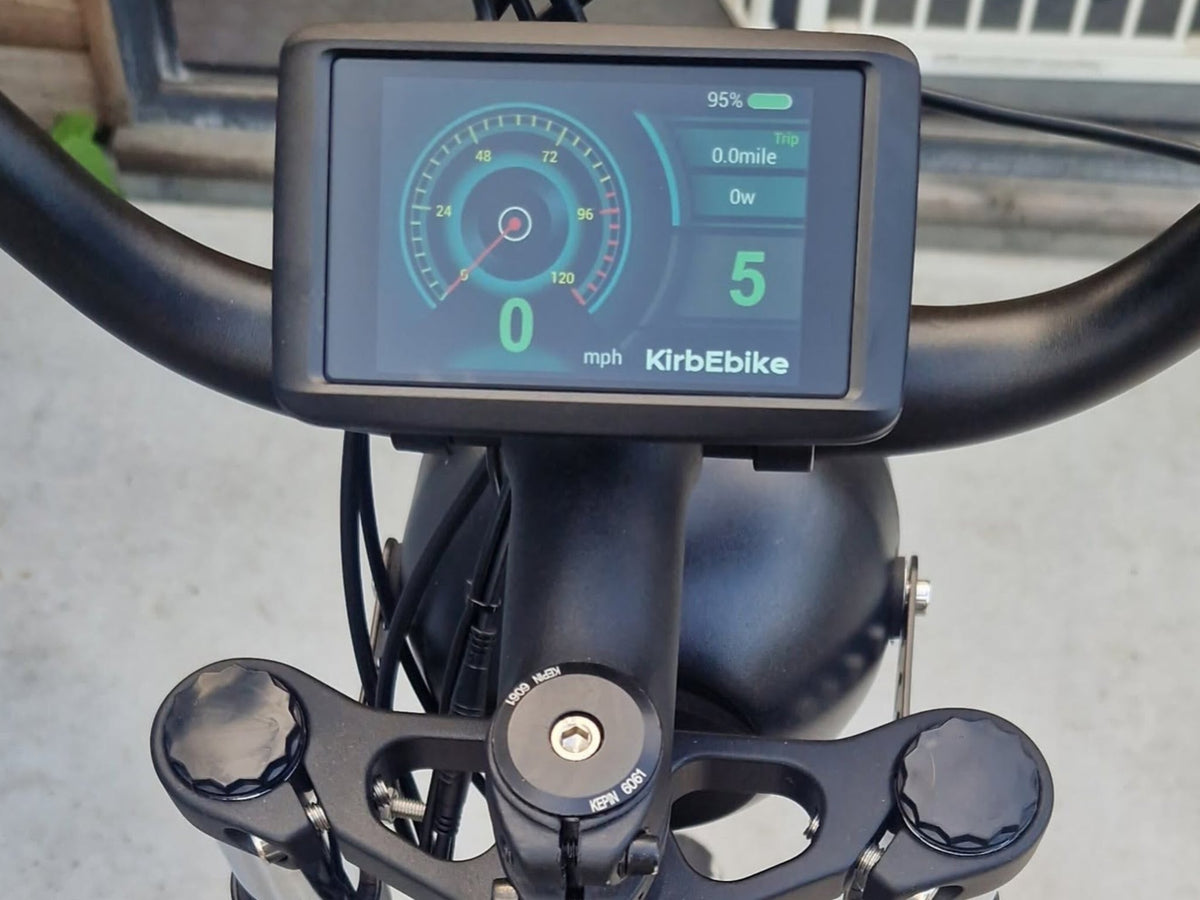
Colour display with an adjustable mount.
That last step deserves expanding, because "it turned on" is where most people stop. Check the assist levels change something, the speed reading responds to the wheel turning, the walk-assist function behaves as documented, any error codes are absent or explainable, and the throttle and brake cut-off still work. Only then take it to the road. If the wrong display has previously been connected to your system, mention that when you contact support — it changes what they need to check. Our compatibility checklist covers the wider build.
Replacement Display Options
Display and controller as a matched pair. Kits ship with both already matched.
Four routes, listed alphabetically and judged on the same criteria: what they connect to, how compatibility is established and the main limitation. Confirm the pairing with the supplier before ordering in every case.
1. Bafang HMI Family
The display range designed around Bafang drive systems, covering several screen types across their motor families. Compatibility is established within the ecosystem rather than by connector shape, and the useful consequence is that Bafang publishes which display suits which system. The limitation is the flip side: these are designed for Bafang controllers and generations, and fitting one to another manufacturer's controller is exactly the kind of pairing this article warns about, however well the plug fits.
2. EggRider V2
A third-party smart display with a companion app, notable because it explicitly publishes which systems it supports rather than leaving buyers to guess. Compatibility is specific and stated: it suits particular display-connection types rather than all controllers, and works within a defined voltage span. That transparency is the reason to consider it. The limitation is that its support list is finite, and a controller outside that list is outside it regardless of how similar the connector looks.
3. Generic KT and SW900-Style Displays
The large marketplace category of low-cost replacement displays, and where most buyers end up when an original fails. The appeal is genuine: they are cheap, widely available, and the common protocols behind them are used across many kits. The cautions are equally real. Listings frequently state a protocol name without a version, pinouts vary between production runs of visually identical units, and support after purchase is usually minimal. Ask for a pinout with orientation stated before ordering.
4. KirbEbike Displays
Our LCD81F, NC-S6 and UKC1++ displays are supplied for use with compatible KirbEbike controllers — see the display and controller range. Kits arrive with the display and controller already matched. For a replacement, request the confirmed pairing for your exact display and controller generation before ordering, and treat combinations with third-party controllers as unverified until we confirm them.
Option
Designed for
Compatibility established by
Main limitation
Bafang HMI
Bafang drive systems
Published within the ecosystem
Tied to Bafang controllers
EggRider V2
Specific supported systems
Published support list
Finite list; check before buying
Generic KT / SW900-style
Common protocol families
Seller-stated, often thin
Pinouts vary between runs
KirbEbike displays
Compatible KirbEbike controllers
Confirmed by support per pairing
Third-party controllers unverified
Listed alphabetically. In every case, confirm the specific pairing rather than the category.
Can You Ride Without the Display?
Sometimes, and it depends on how the system is designed. On many kits the display is part of the power-on logic — it carries the on switch and tells the controller to enable output, so removing it means the bike will not start. On others the controller can operate with an alternative interface, and some systems allow an app to take over configuration and monitoring while a physical display is absent or failed.
Two cautions. Do not improvise a workaround to bypass a display that is part of the power-on chain: that path usually involves defeating something the manufacturer put there deliberately. And an app substituting for a display is a manufacturer-supported arrangement or it is nothing — ask whether your system supports it rather than assuming. If your display has failed and you need the bike working, the supported replacement is a faster route than a workaround.
Display Settings and Legal Classification
Worth stating plainly because displays are where speed settings live. A display setting is a configuration feature, not proof of legal classification, and this holds on both sides of the Atlantic. In Great Britain a converted cycle is an Electrically Assisted Pedal Cycle only when it has working pedals, a motor rated no higher than 250W continuous and assistance cutting off at 15.5mph (GOV.UK), and the Department for Transport treats a switchable higher-speed mode as itself taking a cycle outside compliance (GOV.UK EAPC standards). In the United States, the federal low-speed electric bicycle definition turns on fully operable pedals, a motor under 750 watts and a top speed under 20 mph on motor power alone (15 U.S.C. §2085), with state riding rules layered separately on top.
So changing a display, or changing a setting within one, does not alter what your motor is rated at or what class your completed bike falls into. Fit a display because the old one failed or because you want better information, not because you expect it to change the bike's legal position.
Same plug, different system. Two displays can share a connector and still differ in protocol.
Final Compatibility Checklist
Confirm before ordering
Stop and ask if unknown
Controller model and generation
Any item on this list you cannot answer
Display voltage requirement
Whether the display has been validated with your controller
Communication protocol, named specifically
Whether firmware versions are compatible
Connector family, pin count and keying
Whether a previous wrong display may have caused damage
Pinout with viewing orientation stated
Whether an app can substitute if the display fails
Firmware or app dependency
Whether limit-mode behaviour changes with the display
One unknown is enough to stop. Ask the supplier rather than ordering and hoping.
Product touchpoint
Ask for the pairing, not the plug
One message saves the whole problem: give your controller model and generation and ask which display is confirmed for it. We will send the verified pairing for any KirbEbike display or controller rather than a general description. If you are building rather than replacing, a complete kit arrives with the display and controller already matched, which removes the question entirely.
Ebike displays are not generally interchangeable. A replacement has to match system voltage, communication protocol, connector family, pinout and controller firmware generation, and the connector is the only one of those you can assess by looking. That is precisely why the plug is the check people rely on and the reason so many replacements arrive, light up and do nothing useful.
So work from the controller outward: identify its model and generation, record what a display must satisfy, fill in every row before you buy, and treat any unknown as a reason to ask rather than to order. Power down before swapping, and test controls, assist levels, speed reading, error codes and the brake cut-off with the wheel raised before you ride. And remember that a display setting is a configuration feature rather than a legal classification (GOV.UK) — changing the screen changes what you can see, not what your bike is.
Five checks, and the plug is only one
Give us your controller model and generation, and we will confirm the display.
Generally no. A replacement must match system voltage, communication protocol, connector family, pinout and controller firmware generation. A matching plug satisfies only the first of those checks.
Will any display work if the connector fits?
No. Connector families such as Higo and Julet are shell standards, not wiring standards, so the same five-pin plug appears across products with different pin functions and different protocols.
What is the difference between UART and CAN bus displays?
They are different communication arrangements between display and controller. Matching the category is not enough either, because two units described as UART can still use different message formats and fail to communicate.
My new display powers on but the bike will not move. Why?
A display can receive power through a supply pin while failing to exchange data with the controller. Powering on is a partial test; check assist levels, speed reading, error codes and motor response.
How do I find my ebike controller model?
Look for a label on the controller itself, the documentation supplied with the kit, or the original listing. Record the generation as well as the model, because manufacturers revise protocols between production runs.
Can I ride an ebike without the display?
It depends on the system. On many kits the display carries the power-on logic, so the bike will not start without it. Some systems support an app or alternative interface, but only where the manufacturer provides it.
Can I use a Bafang display on another controller?
Not reliably. Bafang displays are designed around Bafang systems and generations, and fitting one to a different manufacturer’s controller is exactly the pairing that fails despite the plug fitting.
Does changing the display change my legal speed limit?
No. A display setting is a configuration feature, not a legal classification. Classification depends on the motor’s rated power, working pedals and where assistance cuts off, plus your local rules.
What should I ask before buying a replacement display?
Controller model and generation, display voltage requirement, the specific protocol, connector family and pin count, the pinout with viewing orientation stated, and any firmware or app dependency.
Could a wrong display have damaged my controller?
It is possible, particularly if supply voltage reached a signal pin. Mention any previous wrong display when you contact support, because it changes what needs checking before fitting a replacement.
A note on safety & legality. General information, not a substitute for the manufacturer’s documentation. Disconnect the battery before swapping any display or connector, never identify a pin function by wire colour, and never force a connector that nearly fits. Verify voltage, protocol and pinout from documentation for both parts before connecting, and test all functions with the driven wheel raised and secure before riding, including assist levels, speed reading, error codes and the brake cut-off. Do not improvise a bypass for a display that forms part of the power-on chain. A display setting is a configuration feature and not a legal classification: in Great Britain an EAPC needs working pedals, a motor rated no higher than 250W continuous and assistance stopping at 15.5mph, and in the United States the federal definition turns on operable pedals, a motor under 750 watts and under 20 mph on motor power alone, with state rules applying separately (GOV.UK).
About this guide
Author: Andy Kirby. Technical review: KirbEbike conversion-support team. Last reviewed: October 2026. Methodology: UK legality is cited to GOV.UK and the Department for Transport, US federal definition to 15 U.S.C. §2085, and battery safety to GOV.UK and London Fire Brigade, all cited inline. This article publishes no pinout or voltage range for any display; readers are directed to request the confirmed pairing for their exact display and controller generation. The compatibility matrix section publishes the structure a buyer should record rather than a filled table. Product capabilities are the manufacturers’ own published claims; no seller’s general compatibility statement has been treated as a validated pairing.
Stay in the know
Conversion guides, fitting advice and the deals worth knowing about. No spam.
Door je aan te melden ga je akkoord met ons Privacybeleid.